Polygon
Use
controls on the Polygon tab to draw a multi-sided area on a map.
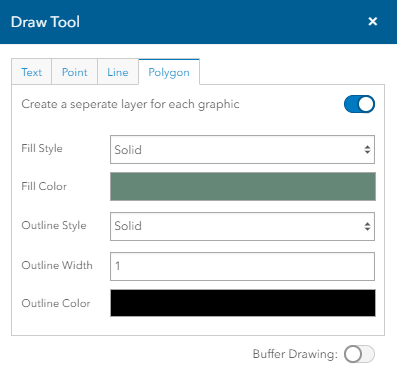
Fill Style- Select the type
of fill, solid or pattern, for the polygon area.
Fill Color - Select the
color of the polygon's fill using the Color Control.
Click here for
a description of color controls.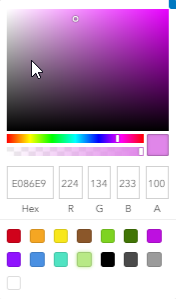
Outline Style- Select
the type of outline (solid, dotted, and dashed options) you want for the
polygon.
Outline Color - Select
the color of the outline using the Color Control.
Click here for
a description of color controls.
Outline Width - Enter
the thickness of the outline in points.
Create a separate
layer for each graphic - Turn
this togglebox on to place each graphic as its own layer. Turnoff the
togglebox to place all objects as a single layer.
Buffer Drawing
- Turn this togglebox on
to display buffer controls for
showing a given distance or distances around the selected feature. Click
here to show buffer options.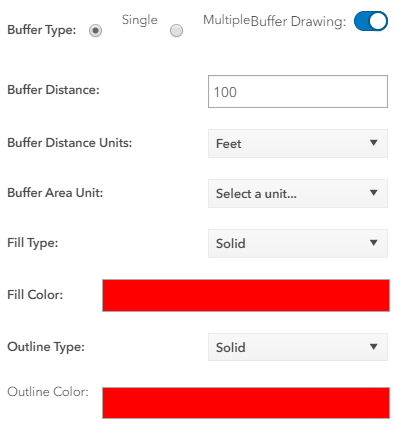
Buffer Type - Select the radio
button for the type of buffer you want to display:
· Single - Displays a single
distance from the selected feature, for example, 10 miles.
· Multiple - Displays more than
one distance from the selected feature, for example, 5, 10, and 15 miles.
Buffer Distance - Enter the
distance from the feature that you want to display.
Note: When multiple Buffer
Type is selected, enter numbers separated by commas for each distance
you want to display.
Buffer Distance
Units - Select the units from the drop down list.
Buffer Area Unit - Select a Unit
from the dropdown list.
Fill Type - Select the
type of fill, solid, Backward Diagonal,Cross, Diagonal Cross,Forward Diagonal,
Horizontal, Vertical and None for the buffer area.
Fill Color - Select the
color of the buffer's fill.
Outline Type - Select
the type of outline (solid, Dotted and dashed options) you want for the
buffer.
Outline Color - Select
the color of the outline.